Glasswall CDR removes hidden malware in SVG files without disrupting content
Attackers are increasingly turning to SVG (Scalable Vector Graphics) files to slip phishing content past email and web filters. SVG smuggling techniques use the format's XML (Extensible Markup Language) structure to redirect users to malicious domains, run JavaScript, or build entire credential-harvesting forms inside what looks like an ordinary image.
The technique has grown common enough that MITRE ATT&CK, the industry-standard framework for classifying attacker techniques, now tracks it as its own sub-technique: T1027.017, "SVG Smuggling," added in March 2025. Hoxhunt's "SVG Phishing Email Attachments" report (October 2025) found SVG attachments went from 0.1% of all attachment-based phishing in 2024 to 4.9% in the first half of 2025, peaking at roughly 15% of attachment-based phishing in March 2025.
Variations to an old theme
SVG is an XML based file format used to present graphics, typically in web browsers. Because it's XML, an SVG file can carry arbitrary attributes and fields, and malicious actors use that flexibility to hide payloads and other unwanted content. SVG interpreters can also run JavaScript embedded inside the image file, which is what makes the format a genuine security concern rather than a theoretical one.
Terranova Security's "Phishing with Scalable Vector Graphics (SVG)" report (October 2025) traces the first observed malicious SVG attachments to late 2024, with large-scale SVG-based phishing campaigns starting in earnest around May 2025. Malwarebytes documented one such campaign in September 2025 ("New SVG-based phishing campaign is a recipe for disaster"), with samples dating back to August 26, 2025 that embedded the victim's own email address directly in the file to make the lure look more convincing.
Three named attack variants
Security researchers, including VMRay in its August 2025 research, group most malicious SVG activity into three variants:
Redirector SVGs: the file's only job is to open the browser at a malicious domain, where the actual credential harvest happens.
Self-contained phishing SVGs: the entire phishing form is built inside the SVG itself using a foreignObject element, so there's no redirect for a filter to catch.
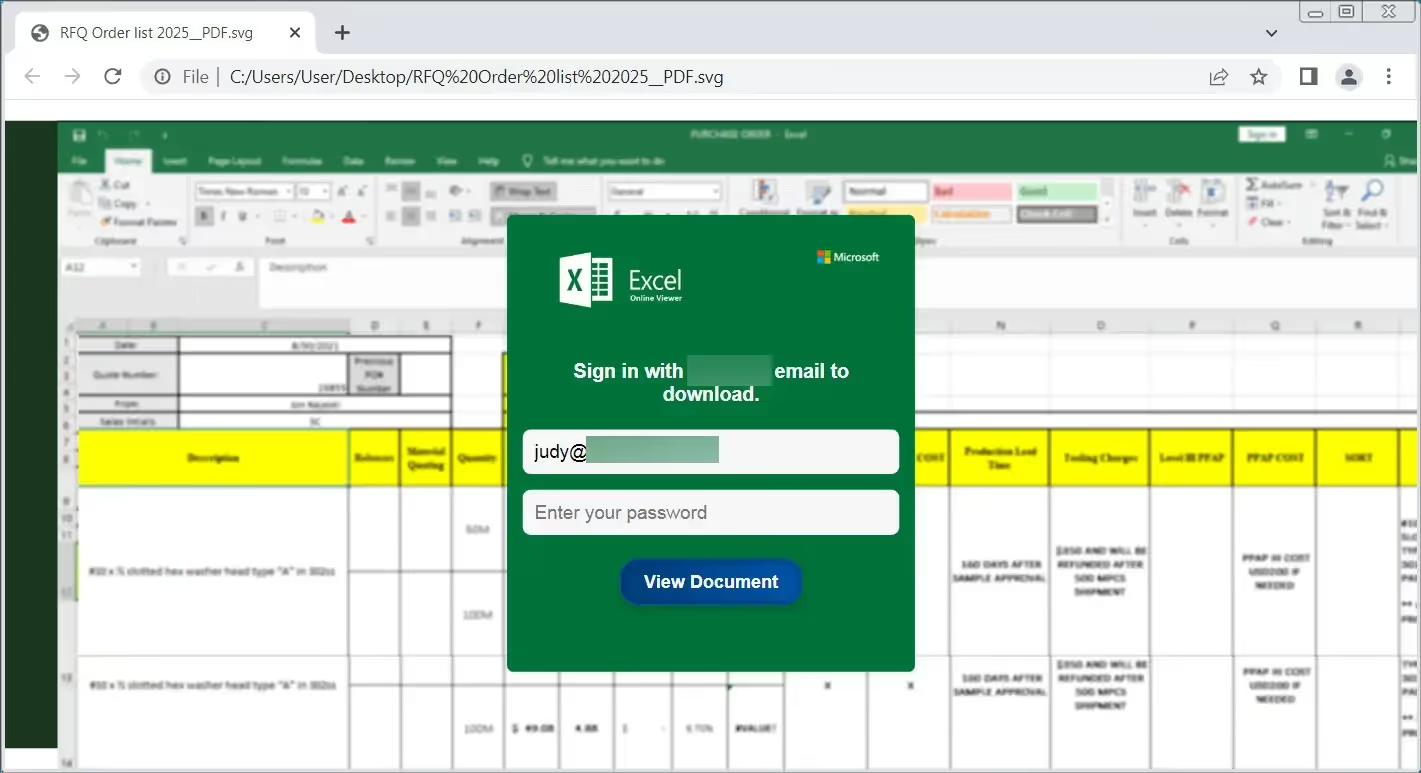
Interaction-gated SVGs: the file waits for the victim to act. A fake "document is locked" message asks the user to enter credentials to unlock it, and only sends the data to a malicious domain once they click "unlock" or "proceed."
Older SVG-based attacks typically did one of two things: embed JavaScript to exploit a browser vulnerability on opening, or redirect the browser to a credential-harvesting domain. The interaction-gated technique disclosed by the MalwareHuntingTeam is more deliberate. It renders encoded, interactive fields that ask the user to unlock a document, then sends whatever they type to a malicious domain instead of redirecting them anywhere.
How attackers hide the payload
Encoding and obfuscation make these files harder for filters and analysts to catch:
Payloads encoded with Base64, ROT13, XOR or AES so the malicious content doesn't appear as plain text.
Double-extension filenames, such as "invoice.xls.svg," designed to make the file look like a spreadsheet rather than an image.
Hosting on trusted infrastructure, such as Cloudflare Workers or pages.dev, to blend in with legitimate traffic and get past DMARC, SPF and DKIM email checks.
CDR removes unwanted SVG content
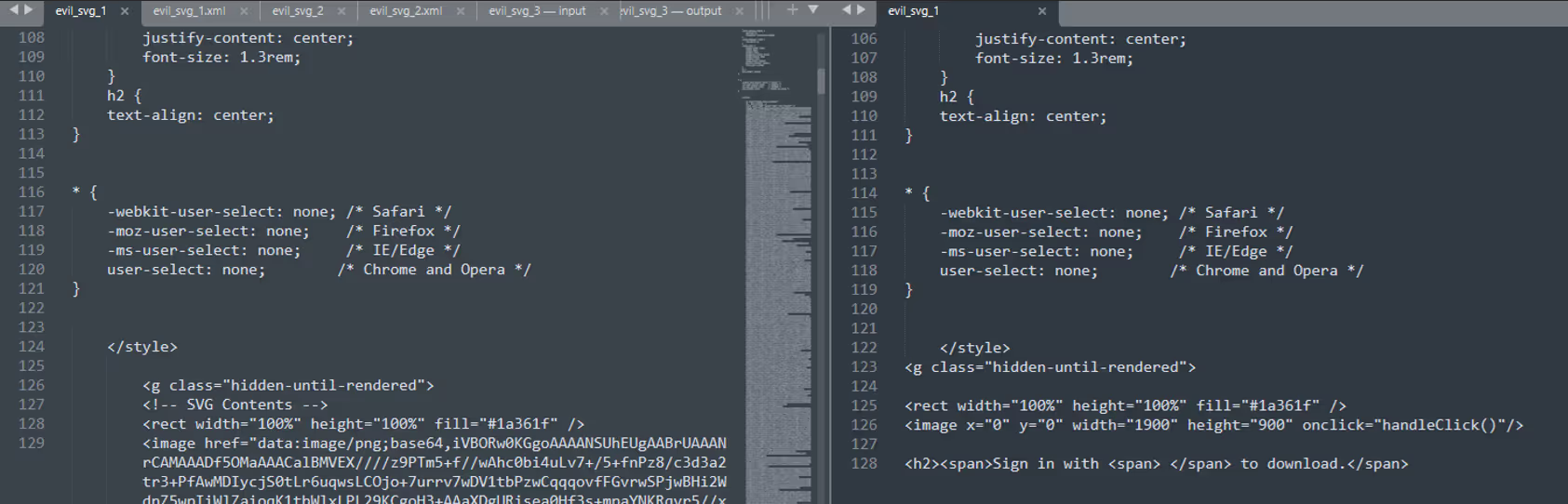
Glasswall's Content Disarm and Reconstruction (CDR) technology scans every SVG file and detects unwanted components, such as JavaScript or foreignObject elements, that are commonly used to hide malicious content. The CDR process dissects, analyzes and removes these elements while leaving the image data intact, so the file keeps its intended content but loses anything built to interact with, redirect or collect information from the user.
In the sample shown above, an in-the-wild file was run through Glasswall's CDR process, and the class containing the encoded, malicious interactive fields was stripped out during remediation. What's left is an SVG file with the JavaScript and foreignObject data removed: no interactive fields, no redirect, no hidden form, just the image.
Frequently asked questions
Can SVG files contain malware?
Yes. Because SVG is an XML-based format, it can carry embedded JavaScript, foreignObject elements and encoded interactive content, which attackers use to redirect users, harvest credentials or run malicious code.
Are SVG files safe to open?
Most SVG files are simple images and open without incident. The risk comes from SVGs that carry hidden JavaScript or interactive fields, which is why security teams have started treating unexpected SVG attachments the same way they'd treat any other untrusted file.
Can a .svg file be malicious?
Yes. Attackers use the SVG format's XML structure to embed redirects, scripts or entire fake login forms inside what displays as an ordinary image.
Can SVG files contain JavaScript?
Yes. SVG interpreters can execute JavaScript embedded in the file, which is one of the main reasons the format has become a phishing vector.
How do I detect malware in an SVG file?
Manual inspection means opening the file's XML and checking for <script> tags, foreignObject elements or encoded strings, but that doesn't scale. CDR technology automates this by rebuilding every SVG against a known-good structure and removing anything that doesn't belong, regardless of whether it matches a known signature.
What is SVG smuggling?
SVG smuggling hides malicious content, whether scripts, redirects or phishing forms, inside an SVG image file to get past filters that only look for known threats. MITRE ATT&CK classifies it as sub-technique T1027.017.
Connor Morley
Connor is a highly experienced security expert and researcher with a strong background in threat hunting, detection and remediation. At Glasswall, he focuses on threat analysis, research and defense development (theoretical and POC).
See what Zero Trust file protection looks like. Live, in 25 minutes.
A tailored walkthrough of how Glasswall rebuilds files to a known-good state, removes hidden threats, and provides the intelligence you need to understand file risk.
What's in the demo
See malicious files rebuilt in real time Watch Glasswall remove hidden threats and return a safe, usable files.
Integrate security without disruption See how Glasswall fits into your existing workflows and infrastructure.
Gain complete visibility into file risk Uncover threats, anomalies and hidden file intelligence.
“
Beazley's security is paramount, and this integration has significantly reinforced our cybersecurity framework.
Thank you! Your submission has been received!
Oops! Something went wrong while submitting the form.

.avif)




.png)